RussianEditor33.0.1
Publisher Description
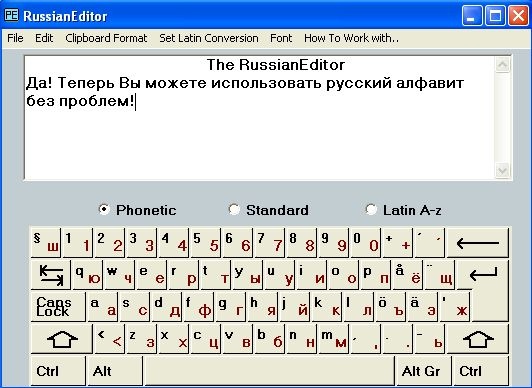
A Russian Note-Pad like editor for Western Windows with an on screen keyboard for Cyrillic writing. Includes cut and paste functions for raw text and for text conversions into other text formats of Cyrillic text or Latin conversion via the clipboard. The on screen keyboard directly responds to the keys on the physical keyboard. The keyboard is shown with the natural keyboard Latin letters together in pair with the keys which are used for writing. The program check for current keyboard set-ups and the Latin key layout becomes the same as on current setting.
The keyboard can be set to Cyrillic editing with phonetic placement corresponding to the Latin Letters, to the standard Russian keyboard or to Latin character used in code page 1251. All editing are with fonts which correspond to the Cyrillic code page 1251, but editing in itself is in code page 1252 Latin 1. The cut and paste function can be used for copying ANSI code between code pages. This makes it possible to read Russian raw ANSI text files, which otherwise would be unreadable on a western based Windows platform. With the advanced text format setting cut and paste function can be made between texts with ANSI Cyrillic in the editor and other formats via the clipboard. The clipboard stores text formats in UNICODE, Rich Text and HTML. This enable editing of texts which can be pasted into other editors, word processors, email software's and search engines which can display Cyrillic text. Includes print functionality. The Cyrillic text can be copied with the cut and paste function into Latin text in 5 different formats. The first is transliteration the other are transcription in standards used for English, German, French and Swedish respectively. The Cyrillic fonts can be set to different sizes and be displayed in bold or italic. The editor can be resized and position on the screen. These settings are stored on the computer between program runs.
About RussianEditor3
This Text/Document Editors program is available in English, Russian. It was last updated on 02 November, 2026. RussianEditor3 is compatible with the following operating systems: Windows.
The company that develops RussianEditor3 is Rendaxa Software. The latest version released by its developer is 3.0.1. This version was rated by 1 users of our site and has an average rating of 4.0.
The download we have available for RussianEditor3 has a file size of 5.2 MB. Just click the green Download button above to start the downloading process. The program is listed on our website since 2008-09-22 and was downloaded 144 times. We have already checked if the download link is safe, however for your own protection we recommend that you scan the downloaded software with your antivirus. Your antivirus may detect the RussianEditor3 as malware if the download link is broken.
How to install RussianEditor3 on your Windows device:
- Click on the Download button on our website. This will start the download from the website of the developer.
- Once the RussianEditor3 is downloaded click on it to start the setup process (assuming you are on a desktop computer).
- When the installation is finished you should be able to see and run the program.
Program Details
System requirements
Download information
Pricing
Version History
version 3.0.1
posted on 2008-09-22
Cyrilliic to Latin conversion. Keyboard mouse enabled.
